
Purchasing a property is a significant milestone and a financially important transaction. One of the legal responsibilities you bear as a property buyer in India is to deduct and deposit Tax Deducted at Source (TDS) under Section 194-IA of the Income Tax Act. This requirement are applies whe006E property value exceeds Rs50 lakhs.
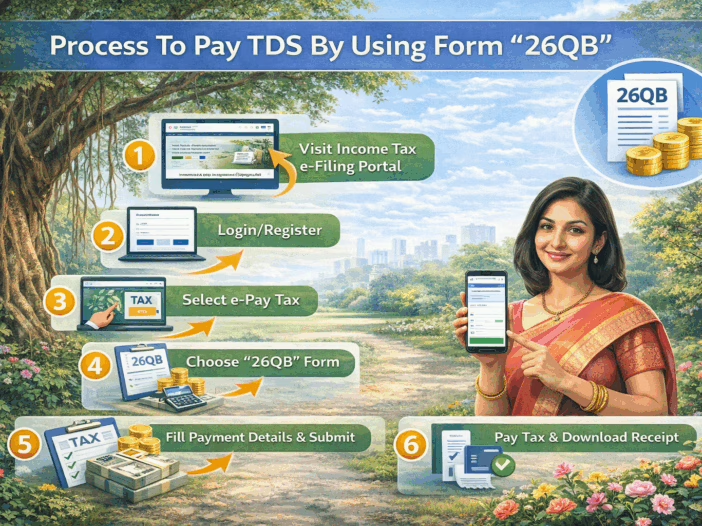
In this letter, PROCESS TO PAY TDS BY USING FORM “26QB” we offer a comprehensive, step-by-step guide to help you understand and complete the TDS payment using Form 26QB and also obtain Form 16B, which must be handed over to the seller as proof of TDS deduction.
Understanding Section 194-IA: Applicability & Requirements
- Applicability: TDS under Section 194-IA is applicable if:
- The property value is Rs. 50 lakhs or more.
- The buyer is responsible for deducting TDS at the rate of 1% of the consideration amount.
- TAN Not Required: The buyer does not need a TAN (Tax Deduction Account Number).
- TDS must be paid within 30 days from the end of the month in which transaction is done.
- Form to Use: Use Form 26QB to make this payment online.
Step-by-Step Filling Form 26QB and Making TDS Payment
Step 1: Visit the TIN-NSDL Website
Go to the TIN-NSDL portal.
- Select TDS on Sale of Property (Form 26QB) under ‘TDS on property (Form 26QB)’.
- Click on “Proceed”.
Step 2: Fill in Form 26QB Details
You will be required to input the following details:
Property Details:
- Complete address of the property including PIN code.
- Date of agreement or sale.
Buyer Details:
- PAN number (must be valid).
- Full name, address, contact number.
- Email ID.
Seller Details:
- PAN number (verify correctness).
- Full name and address.
Transaction Details:
- Total consideration value.
- Payment type: Lump sum or installment.
- TDS amount (1% of total sale value).
- Date of payment or credit to seller.
Step 3: Verify & Submit the Form
- Re-check all the details for accuracy.
- Click “Proceed”.
Step 4: Make TDS Payment
You’ll be redirected to the e-payment page. Choose from two options:
- Online Payment (Net Banking):
- Select your bank and make the payment.
- After successful payment, will get a (Challan 280) containing the CIN (Challan Identification Number).
- Offline Payment (e-payment without Net Banking):
- Generate an acknowledgment slip.
- Visit your bank branch with this slip and make payment manually.
- Bank will issue the challan.
Post-Payment Procedure: Downloading Form 16B
TDS is deposited, the next step is to download Form 16B, which is a TDS certificate issued to the seller.
Step 1: Register on TRACES
- Go to the TRACES portal.
- Click on “Register as New User”.
- Choose Taxpayer complete the registration using your PAN and details.
Step 2: Login to TRACES
- Login using if your credentials.
- Navigate to Downloads > Form 16B (for Buyer).
Step 3: Request for Form 16B
- Enter the Acknowledgment Number from Form 26QB.
- Provide PAN the seller and other property transaction details.
- Submit the request.
Step 4: Download Form 16B
- Wait for 1–2 days after submitting the request.
- Go to Downloads > Requested Downloads.
- Download the Form 16B as a PDF.
This Form must be handed over to the seller as proof of TDS deduction and can also be useful during property registration or future income tax scrutiny.
Common Errors and How to Avoid Them
- Incorrect PAN: Always verify both buyer and seller PAN numbers.
- Mismatch in Amounts: Ensure sale consideration and TDS match with sale deed.
- Late Payment: Ensure payment is made within 30 days to avoid interest and penalty.
- Multiple Buyers or Sellers: Each buyer must file a separate Form 26QB for each seller. For example, 2 buyers and 2 sellers are 4 Form 26QB filings.
Consequences of Non-Compliance
- Interest under Section 201(1A):
- 1% per month for non-deduction.
- 1.5% per month for non-deposit of deducted tax.
- Late Filing Fee under Section 234E: Rs200 per day till return is filed (subject to TDS amount).
- Penalty under Section 271H: Ranges from Rs. 10,000 to Rs. 1,00,000.
Conclusion
Paying TDS through Form 26QB and generating Form 16B is a vital legal step in the property purchase process. Following the steps in this guide will help you navigate the procedure with ease, avoid penalties, and maintain clean documentation.